Agree on the companies you want to win and use account tiers to decide where a bespoke campaign is justified.
Target the buying committee, including the people who evaluate and use the product.
Match the offer to account readiness. Give sales the campaign context before outbound follow-up.
Check which accounts actually receive exposure. Use account-level attribution to examine LinkedIn’s relationship with pipeline.
A LinkedIn ABM campaign can spend its budget while leaving important accounts almost unreached. Before increasing spend, you need to know which target companies are seeing your ads and whether the relevant buying roles are engaging.
This guide explains how to set up LinkedIn ABM campaigns and measure their contribution to pipeline.
What is LinkedIn ABM?
LinkedIn ABM, or LinkedIn account-based marketing, uses LinkedIn advertising and coordinated engagement to reach the buying group at a defined set of target companies.
In account-based marketing, sales and marketing agree on the accounts they want to pursue. LinkedIn provides a way to reach relevant people inside those companies. Broad industry or company-size targeting can support prospecting, but a named-account campaign requires control over which companies belong in the audience.
Define what your LinkedIn ABM strategy should accomplish before opening Campaign Manager. A campaign introducing your company to unfamiliar accounts needs a different offer from one supporting an active evaluation. The steps below cover both situations.
1. Select target accounts and agree on the campaign goal
Build a list of companies your sales team has a reason to pursue. Use your ideal customer profile to filter the list, and review it with the people responsible for selling to those accounts.
Check each company against these criteria:
Company fit: Does it match the industries, company sizes and markets you serve?
Product need: Is there a relevant use case? Look for evidence such as its technology stack or a business initiative your product could support.
Commercial potential: Does the likely contract value justify the advertising and sales effort? Use comparable customers to estimate this.
Sales coverage and account status: Who owns the account? Is it a new prospect, an open opportunity or an existing customer?
For example, a fraud-prevention vendor might select fintech companies with consumer login or payment workflows in markets it supports. Recent engagement could help prioritize that list, but a company does not need to have visited the website to qualify for an awareness campaign.
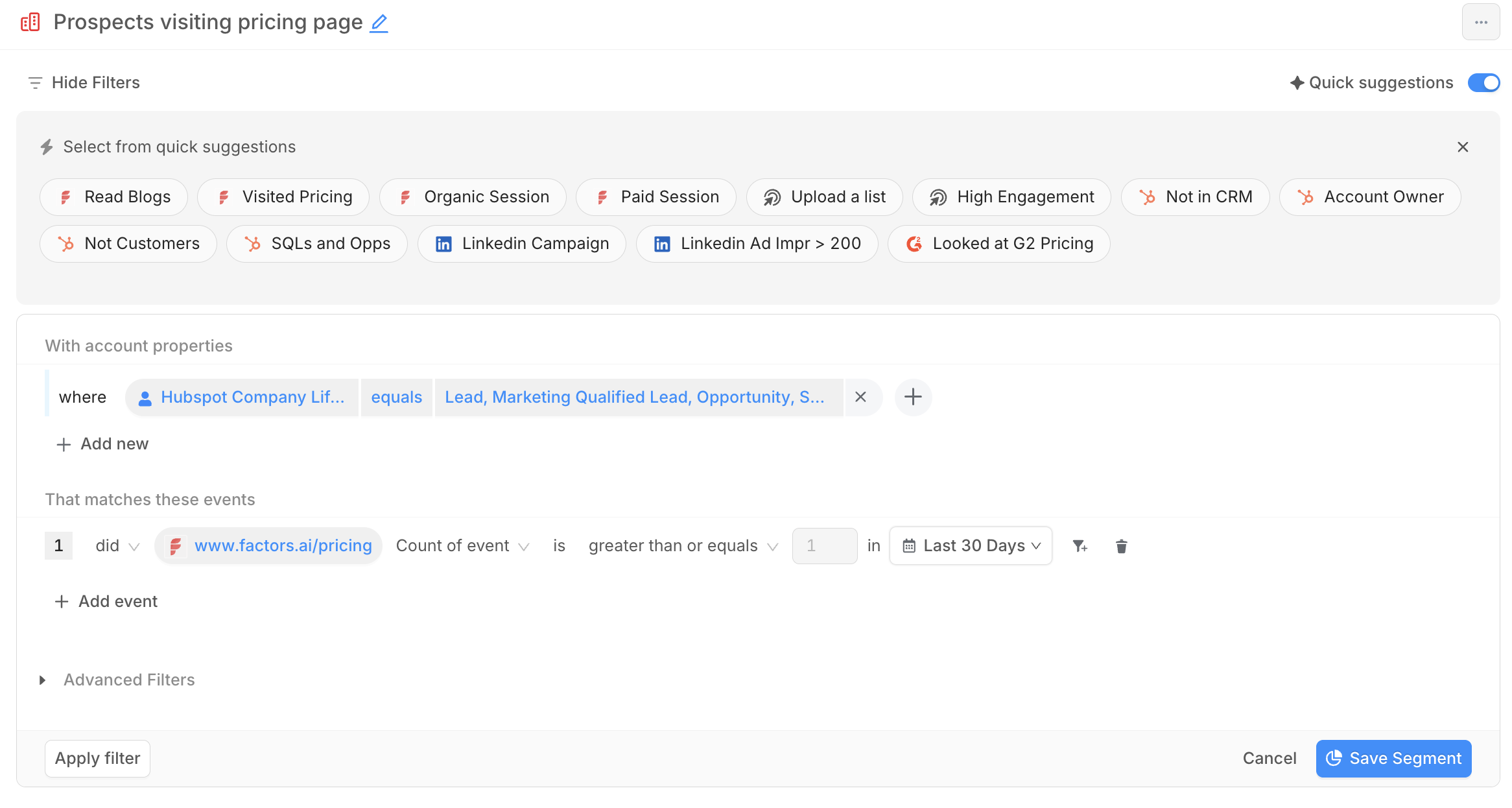
In Factors.ai, you can filter accounts by company properties and CRM stage. Review website activity alongside intent data from connected sources such as G2 or Bombora, and use account scoring to prioritize ICP-fit accounts by their recorded engagement. For example, save a segment of prospects that visited your pricing page in the last 30 days, excluding existing customers.
Filtering prospects by CRM lifecycle stage and pricing-page visits in Factors.
Choose the LinkedIn objective that supports your campaign goal.
Agree on the business result with sales, such as qualified meetings from a named prospect cohort. In Campaign Manager, choose the advertising objective that supports the response you want from members:
LinkedIn objective
When to use it
Brand awareness
Introduce your company to relevant people at target accounts.
Website visits
Bring members to a specific page or resource.
Engagement
Encourage interactions with the ad or LinkedIn Page.
Video views
Promote a video you want the audience to watch.
Lead generation
Collect submissions through LinkedIn Lead Gen Forms.
Website conversions
Optimize for a tracked action on your website.
For a webinar, a registration through a LinkedIn Lead Gen Form fits Lead generation. A registration on your own website fits Website conversions, with registration tracking configured. These are alternative setups for the same offer.
Record what makes the response useful to the business. For example, a webinar registration qualifies when the attendee works at a target account in a relevant role. A form submission alone does not establish that fit.
2. Map the buying committee to LinkedIn targeting criteria
Review who participated in previous purchases, including the people who evaluated the product before an executive approved it. Build your ABM personas around those responsibilities.
Steve Armenti, CEO and Founder of twelfth, describes a client that initially identified CIOs as its audience. Examining the sales process revealed other people doing the research and booking meetings.
For a hypothetical marketing analytics product, map the buying roles before entering job titles:
Buying role
Possible stakeholder
Responsibility in the purchase
Executive sponsor
VP of Marketing
Approves the business case and budget.
Technical evaluator
RevOps lead
Assesses CRM integration and data quality.
Translate the roles into titles or job-function and seniority combinations available in LinkedIn. Validate them against your actual deals; a director may lead the evaluation even when a VP signs the contract.
The CRM analysis in our LinkedIn blueprint report found that deals with six or more contacts engaged before deal creation had a 17.1-percentage-point higher pipeline win rate than the one-contact comparison. The finding concerns contact engagement across channels. Six people receiving ad impressions would not meet that definition.
3. Build and activate the account audience in Campaign Manager
Use the account list from Step 1 and the buying-role map from Step 2 to assemble the audience. Direct company selection uses LinkedIn’s company targeting options. A company-list Matched Audience uses an uploaded or synced list. Contact-list targeting matches members using contact information.
For a company-list upload:
Download the current CSV template from Campaign Manager.
Populate company identifiers, including websites or LinkedIn Company Page URLs where available to help matching.
Allow time for processing and review which companies matched.
Apply location and relevant buying-role filters.
Check the final audience size and exclusions before launch.
The intended logic is target companies AND relevant buying roles, within your chosen geography. Inspect how Campaign Manager combines your filters before publishing.
LinkedIn’s company-list requirements distinguish 300 rows for a CSV upload from 300 matched member accounts for activation. Additional filters can reduce the eligible audience. Processing can take up to 48 hours, occasionally longer.
Meeting the upload requirement does not establish that enough members are eligible. Check identifiers and restrictive filters before adding more companies. Adding poor-fit accounts just to clear the threshold changes whom the campaign reaches.
Apply exclusions to match the campaign’s purpose. A net-new acquisition campaign might exclude customers, while open opportunities receive separate evaluation content. Complete those LinkedIn targeting checks before spending.
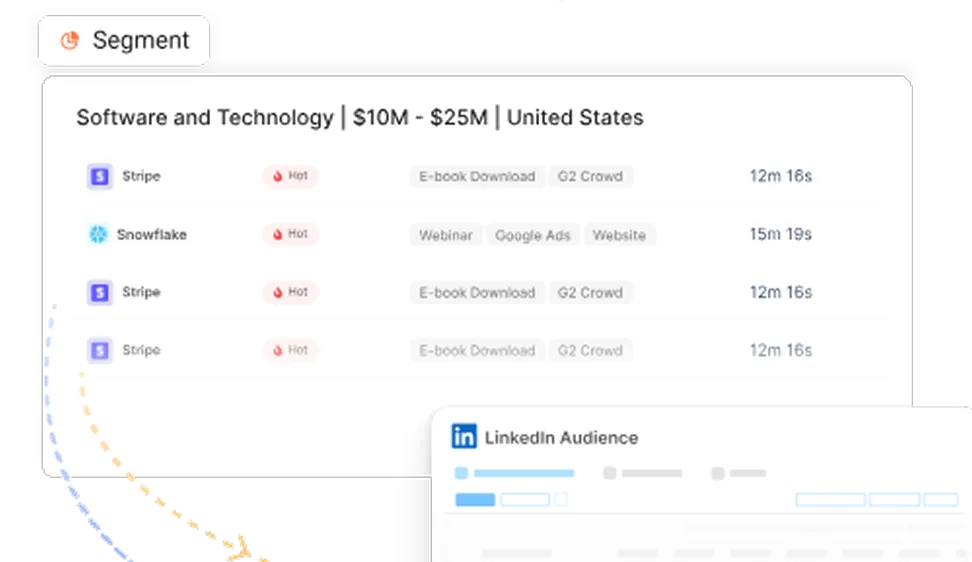
With Factors.ai’s Audience Builder, you can sync the account segment you saved in Step 1 to LinkedIn. Check its matching and eligibility in Campaign Manager before using it. When choosing between pixel and account-based retargeting, decide whether the campaign should reach previous website visitors or relevant people at the companies that visited.
4. Create ads and a landing page around the buying problem
Develop the message for the audience and objective you have already chosen. Account research should give you something relevant to say beyond putting the company’s name in an ad.
In The ABM Playbook Behind High-ACV Deals, Alexander Goodwin, Director of Demand Generation at Fingerprint, describes researching TD Bank’s public filings and company posts. The research helped the team understand business challenges and the priorities of its Platform Protect team.
Build your ABM content around a problem the account has reason to investigate. Explain how your product addresses it, with evidence appropriate to the reader’s role. A RevOps evaluator assessing CRM reporting needs to see how records and campaign activity connect. An executive sponsor needs to understand the reporting gap’s effect on budget decisions.
Choose an ad format supported by your objective and suited to the explanation. A video ad can demonstrate a workflow. The choice between document and single-image ads depends on whether members need to read the explanation in the feed or visit the resource.
Write ad copy that makes the offer clear. If the ad promises a CRM integration walkthrough, the landing page should open with that walkthrough and its relevant requirements. A generic homepage leaves the visitor to find what the ad offered.
5. Set the budget and configure conversion tracking
Estimate the spend needed to reach your audience before splitting it into separate campaigns. For an impression-based planning estimate, use:
Planned unique members reached × average impressions per member × assumed CPM ÷ 1,000.
Reaching 2,000 members over a month, averaging six impressions each at an assumed $100 CPM, would imply:
2,000 × 6 × $100 ÷ 1,000 = $1,200.
These are illustrative assumptions. Replace the CPM with your own campaign evidence; six impressions is not a recommended frequency. Include creative production and sales effort separately in the campaign budget.
Review your actual LinkedIn advertising costs before assigning a separate campaign to every persona. Each split needs enough eligible members and budget to deliver. Set the schedule and bidding options available for the objective selected in Step 1.
Configure tracking for the response you defined there. For a website registration, check that the conversion fires after a successful submission. For a LinkedIn Lead Gen Form, submit a test and confirm that the lead reaches the system sales uses.
Use website tracking for relevant browser events and LinkedIn CAPI for supported server-side conversion feedback, including CRM outcomes. If both send the same conversion, verify deduplication before launch.
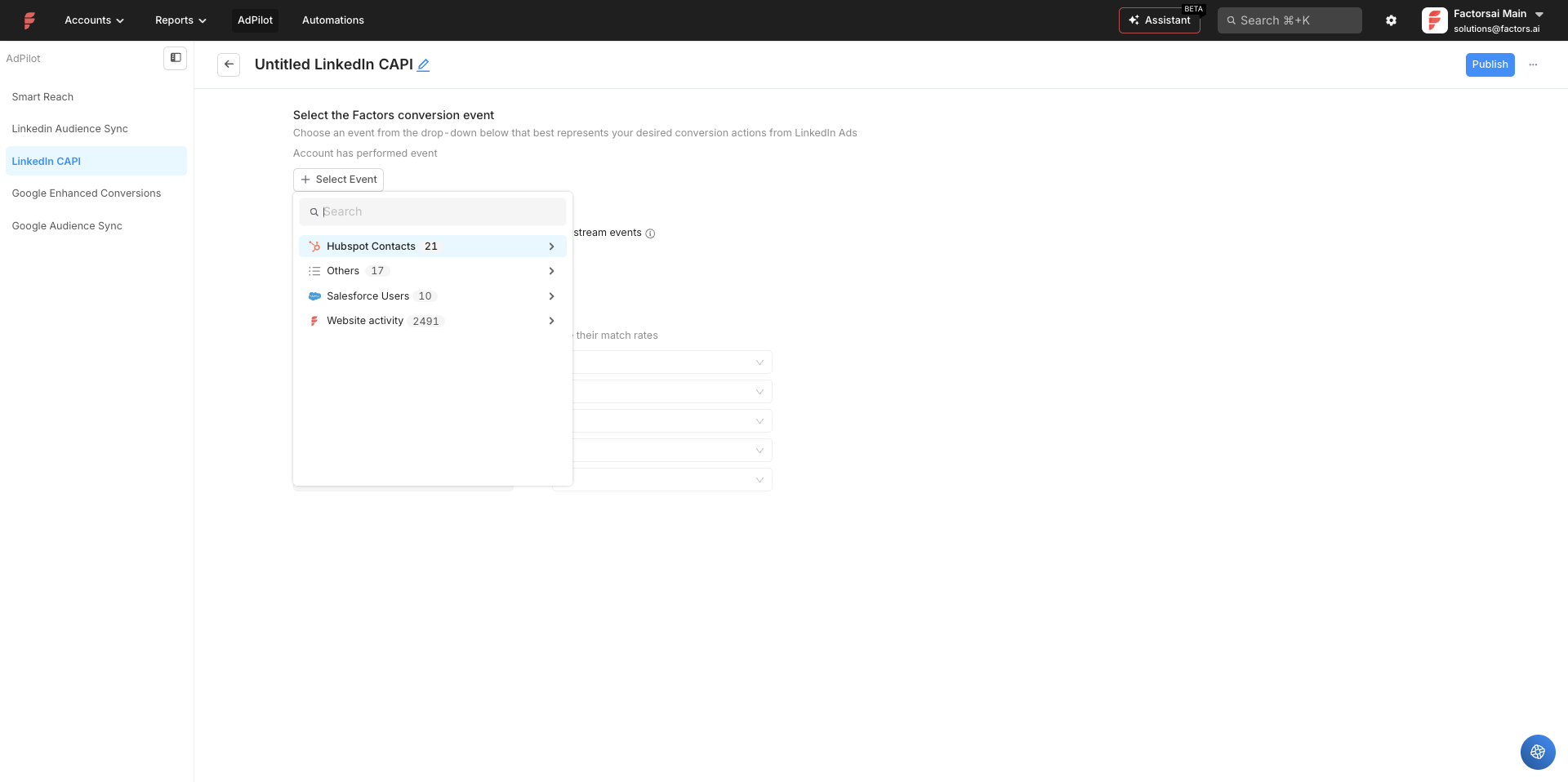
In Factors.ai, open AdPilot → LinkedIn CAPI → Sync New Conversion, select the activity and connect it to the appropriate LinkedIn conversion. The Factors CAPI setup instructions cover the mapping and authorization. Verify receipt in Campaign Manager after publishing the connection.
Selecting the activity to send to LinkedIn through Factors CAPI.
6. Coordinate organic content and sales follow-up
Share the campaign message and offer with sales before the ads go live. The account owner should know what the buyer has been invited to read, watch or attend.
Organic LinkedIn content can address the same buying questions. Goodwin describes how research and executive posts help establish credibility when someone investigates Fingerprint after seeing an ad. A relevant practitioner post can also become a candidate for Thought Leader Ads.
In our From Benchmarks to Blueprints report, accounts with both paid and organic LinkedIn activity showed a win rate 10.8 percentage points above the report’s baseline. The comparison supports reviewing both sources of engagement together; it does not promise that adding organic posts will produce that lift.
Agree on who follows up and when. A demo request needs a direct response. A visit to a pricing page needs the account owner to review the account’s history before deciding whether outreach is appropriate.
In Factors.ai, you can configure a real-time Slack alert for high-intent accounts. For example, trigger an alert when an ICP-fit prospect visits a pricing page. Include the company domain, visited page and CRM status so the owner can review the account without searching for the basic details. Test the alert and limit repeat notifications.
Set an agreed review time, such as one business day, and record the outcome in the CRM. Company-level engagement gives the seller context; it does not identify which individual visited the page or saw the ad.
7. Review delivery and adjust the campaign
Check which target companies receive exposure before increasing spend. Meeting a spending target can conceal heavy delivery to a small part of the account list.
AJ Wilcox, Founder of B2Linked, describes the issue in his Factors webinar: “a few companies eat up all your budget”
Compare companies receiving substantial exposure with those receiving little or no reported delivery. Larger buying committees or higher account priority may justify some differences. Investigate concentration that does not match your plan.
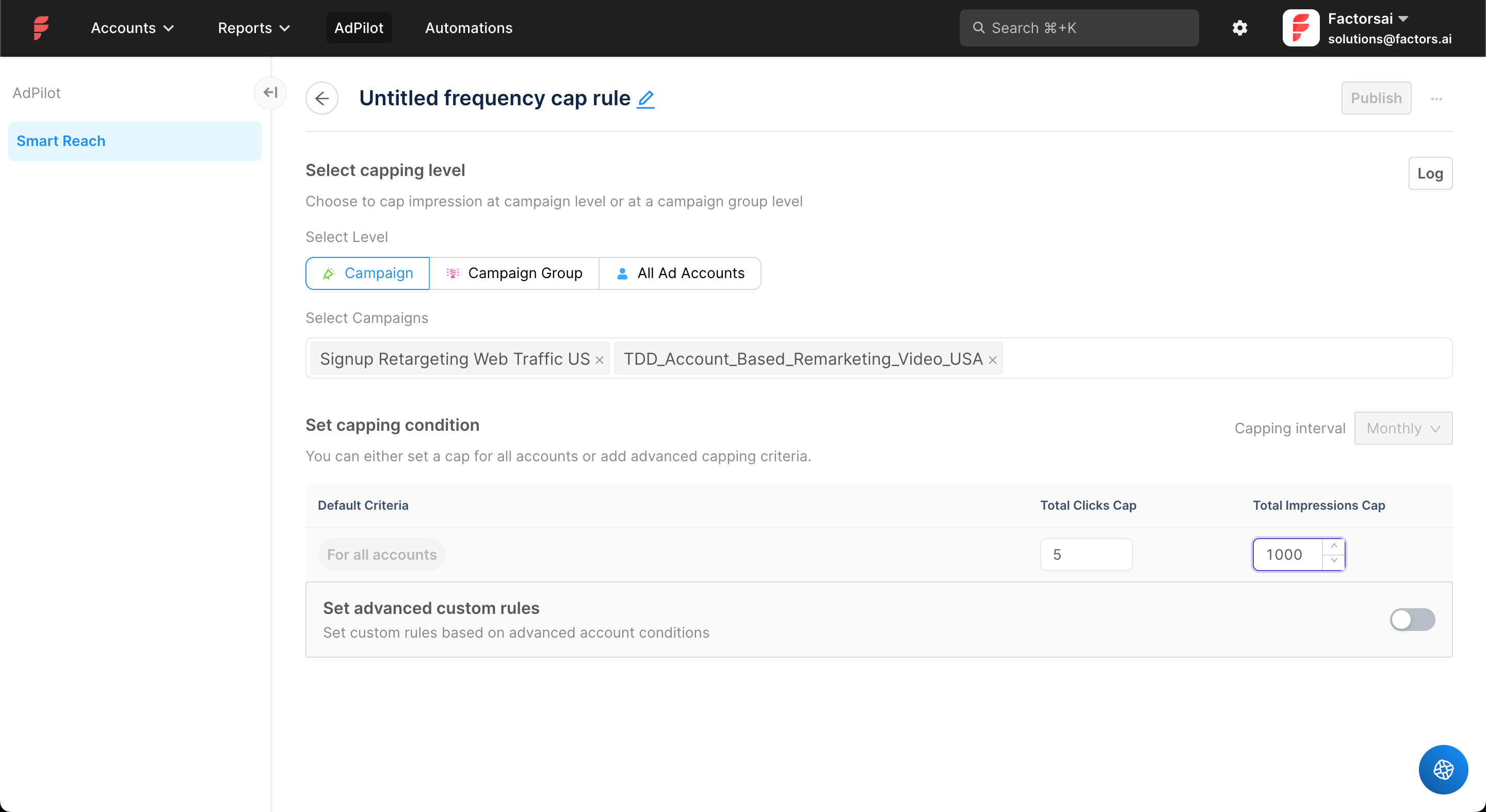
Factors.ai’s Smart Reach lets you set account-level impression or click caps. In AdPilot, choose the campaign scope and capping interval, set the limits and publish the rule. When an account reaches either configured cap, it is excluded for the remaining interval.
Setting campaign-level account caps in Smart Reach. The values shown are examples, not recommended thresholds.
The Smart Reach capping rules allow custom criteria for different account groups. Caps limit overexposure; they do not guarantee equal delivery. The feature supports up to 200 simultaneous account exclusions per campaign, a constraint to consider for larger lists.
Use a weekly campaign review to choose the correction:
What you see
What to investigate
Low matching or insufficient eligible audience
Missing company identifiers or restrictive filters.
Exposure concentrated in a few companies
Account grouping and capping rules.
Adequate coverage with little response
Message relevance and whether the offer addresses the buying problem.
Clicks without the expected website action
Landing-page continuity, form friction and conversion tracking.
Form submissions from unsuitable buyers
Targeting filters and whether the offer attracts the intended roles.
Qualified interest without sales follow-up
Account ownership and the agreed response time.
Read click-through rate alongside account quality. If traffic is expensive, review the CPC controls while preserving the account and role criteria the campaign was built to reach.
How to measure LinkedIn ABM performance
Review delivery while the campaign runs. Qualified engagement can provide earlier feedback than revenue, particularly when the sales cycle is long. Keep the same target-account cohort visible as you examine those different outcomes.
Target companies with reported impressions ÷ companies in the target list
Engaged-account rate
Target accounts meeting your engagement rule ÷ companies in the target list
Buying-role coverage
Known engaged contacts mapped to the roles needed for the purchase
Qualified meetings and opportunities
New outcomes and progression linked to the target cohort
Influenced pipeline and revenue
Opportunities associated with a defined qualifying interaction and reporting window
Keep unmatched and unreported companies visible separately. Missing company-level data should not be silently treated as proof that no delivery occurred.
Measure known contact engagement through first-party responses and CRM records. Company-level ad reporting cannot identify every member who saw an impression.
Keep the attribution definitions explicit. View-through attribution supplies exposure context. Influenced pipeline may appear under several channels, and those overlapping amounts should not be added into an unduplicated revenue total.
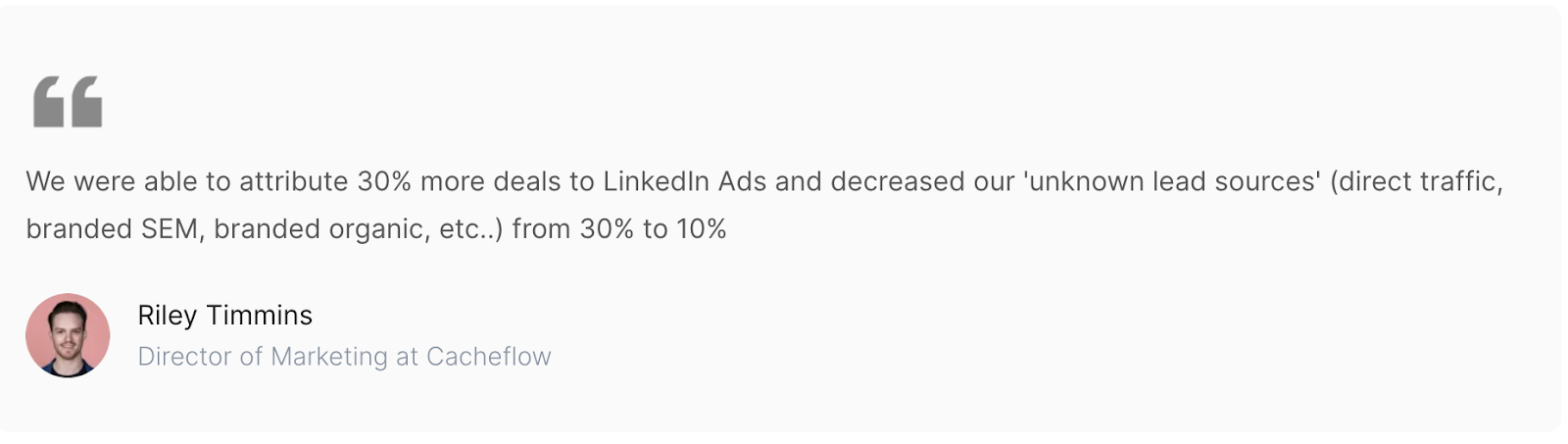
The Cacheflow success story shows how better reporting helped its team recognize LinkedIn’s involvement in deals. More attributed deals means more visibility into recorded influence, rather than proof that reporting itself created extra deals.
Riley Timmins, Director of Marketing at Cacheflow, on improved LinkedIn attribution.
Set an engagement threshold using comparable historical deals
I’d define the engagement threshold from comparable opportunities in your own CRM. A large enterprise evaluation and a smaller-company purchase need different levels of involvement.
Group closed opportunities by account size or deal value. For each group, record known contacts engaged and their responses within a consistent window. Keep anonymous impressions separate from identified contact activity. Compare win rates across the engagement levels and choose bands that describe those patterns. Use the same window when assessing open opportunities at a comparable stage.
Apply those bands to open opportunities. An account with repeated evaluator engagement but no executive involvement may need help making the business case. An account with broad coverage and no response may need a different offer.
At Fingerprint, Alexander Goodwin, describes using leading indicators alongside AE scorecards that track engagement across the buying committee and outreach. The team uses recurring account reviews to decide what to do next:
“We have bi-weekly recurring meetings where we'll go through and review all of that data, ideate on sort of the next step.”
Use the review to agree on a specific account decision. If an evaluator is engaged but the budget owner is missing, assign someone to help the champion involve that stakeholder. If the account has signed with another vendor, reconsider the current campaign spend. Record the next step and its owner so the following review can check whether it happened.
Historical engagement patterns can guide those decisions. When reporting LinkedIn’s contribution to revenue, distinguish recorded engagement from evidence that the campaign caused a win.
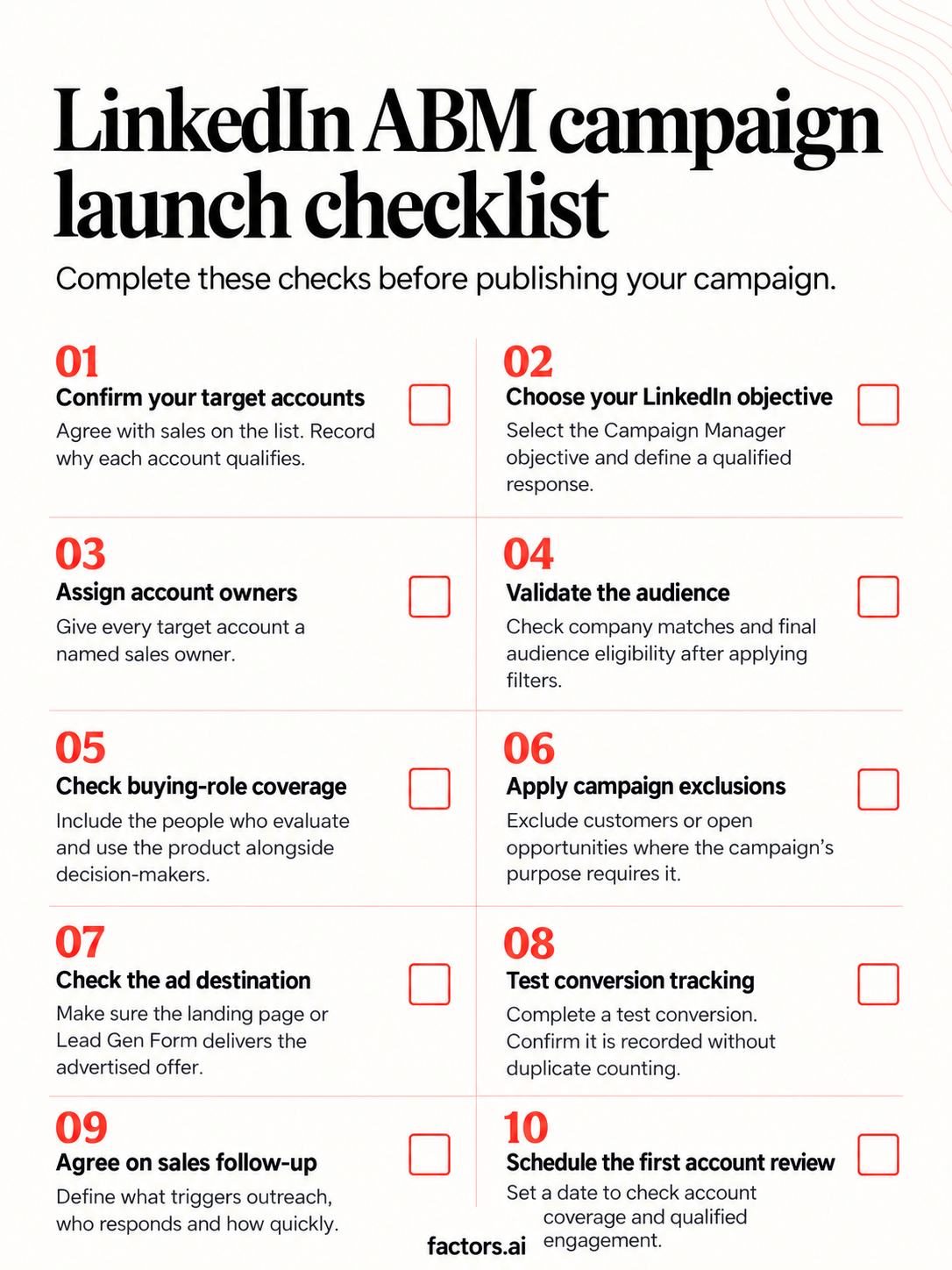
LinkedIn ABM campaign launch checklist
If you need to manage audience sync and account delivery together, LinkedIn AdPilot supports those campaign tasks in Factors.ai. You can request a walkthrough using the account list and reporting questions you plan to work with.
LinkedIn ABM FAQs
These answers cover the remaining setup and evaluation questions.
Do you need Sales Navigator to run LinkedIn ABM ads?
No. Ads run through Campaign Manager. Sales Navigator can support account research and prospecting, but its saved searches should not be assumed to transfer into paid targeting.
Can you run LinkedIn ABM with a small account list?
Yes, provided the chosen targeting route and final member audience meet LinkedIn’s requirements. Company-list CSV upload requirements differ from direct company selection. For smaller ABM programs, keep campaign splits proportional to the audience and budget available.
How long does a LinkedIn ABM campaign take to show results?
Check matching and delivery as the campaign begins. Review qualified engagement during the campaign and opportunity outcomes over your sales cycle. The report’s 124-day finding describes recorded engagement before CRM deal creation; it is not a required campaign duration.
Can you measure LinkedIn ABM without an ad click?
Yes. Supported company-level impression and engagement reporting can show exposure without a website click. Examine it alongside CRM outcomes using defined qualification rules and windows. LinkedIn revenue attribution tools differ in the interactions they capture and how they relate them to opportunities.


.avif)




.svg)



.avif)
.avif)


.avif)



.svg)



.avif)

